
Canonical OpenStack
Enterprise cloud platform engineered for price-performance
Multi-cloud operations are more cost-effective with your own cloud. Your own cloud is more cost-effective with Canonical's Charmed OpenStack.

Proven record of success















Telcos, financial institutions, hardware manufacturers, government institutions, enterprises.
OpenStack and Ubuntu help you optimise infrastructure costs across all market sectors all over the world.
Price-performance guaranteed
Designed to be economical in every way
Smart operations, optimal architecture, better pricing.
All of this to ensure cloud TCO reduction, while expanding your budget for innovation.
Download the datasheet ›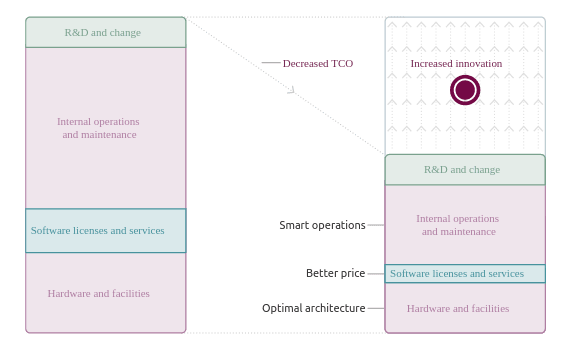


Maximum multi-cloud cost optimisation
Run your workloads where it makes the most sense from an economical standpoint
The future of infrastructure is multi-cloud.
Using private and public cloud infrastructure at the same time allows you to optimise your CapEx and OpEx costs.
Cheaper VMs
Machines cost less if they run in your cloud
Compare the prices of sample VMs running on a baseline Charmed OpenStack cloud over a three-year period. The calculations include hardware costs, typical hosting charges and a fully-managed service*.
Check pricing for other VMs ›* Exact prices may vary depending on the used hardware, cloud configuration, local hosting charges and salary costs.

Cost-effective cloud infrastructure
For private clouds and public clouds.
Learn how Nayatel – a leading service provider in Pakistan – partnered with Canonical to build the country's first cost-effective, enterprise-grade public cloud infrastructure on Ubuntu.
Get your OpenStack
Find the option that suits you best:
-
Who will manage your OpenStack?

Canonical-managed OpenStack
We deploy OpenStack for you and manage it 24/7. This includes typical daily maintenance tasks, incident and problem resolution, recurring upgrades and more. You will rest assured that your cloud is in good hands and benefit from a public cloud-like experience.

Self-managed OpenStack
You manage OpenStack yourself. We can still assist you with the design, help you make the right hardware choices, deploy OpenStack for you, provide full commercial support and get your team up to speed with professional training courses.
-
Who will deploy your OpenStack?

Canonical-deployed OpenStack
We deploy OpenStack for you. Together, we find the design that suits your use case best. We will share our best practices and reference hardware specifications. We will only hand over the cloud to you once we ensure the deployment process is fully automated and repeatable.

Self-deployed OpenStack
You deploy OpenStack yourself. You will rely on public-facing materials only, such as product documentation, whitepapers, etc. Self-deployed clouds based on MicroStack also qualify for full commercial support under any Ubuntu Pro + Support subscription.
Need something else? Visit our OpenStack support page for other possible options and plans.
Total bottom-up automation
Fully automated OpenStack deployment and operations
From bare metal to cloud control plane, Charmed OpenStack uses automation everywhere.
Save time and money by moving to the only OpenStack platform on the market that uses model-driven operations.s
Read how to deploy and operate OpenStack effectively ›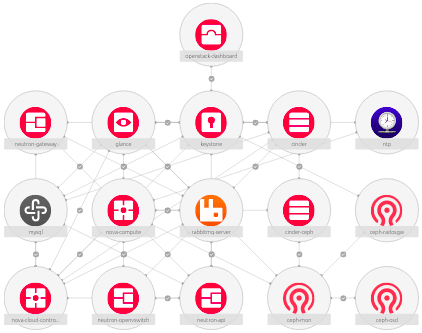
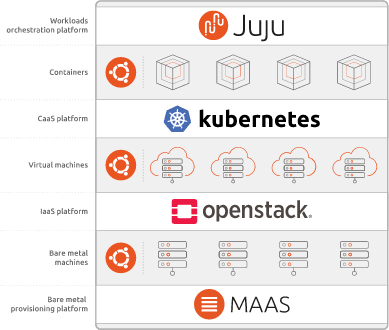
Extendable containers layer
Run both containers and VMs on the same platform
Extend your cloud with a Kubernetes layer running on top of it and benefit from a unified approach to both containers and legacy workloads management.
The entire stack is supported under the same subscription.
Product interoperability
Servers, SDN controllers, storage platforms and more
We partner with leading semiconductor companies, hardware vendors, network equipment providers and open source communities to ensure the best technology choices.
All of that to design the optimal architecture and ensure the best price-performance all of the time.
Read about supported options ›

100 Gbps OpenStack
For telcos, for HPC, for AI/ML
All necessary performance extensions for running NFVI/VIM and other advanced cloud architectures:
- OVN hardware offloading
- SR-IOV
- DPDK
- CPU pinning
- NUMA topology
- Hugepages
- PCI passthrough
- NVIDIA vGPU
Endorsed by customers, globally
Canonical is miles ahead of other providers where every server is manually configured. We also greatly appreciate that Ubuntu is the platform where OpenStack development occurs. This means we're not waiting half a year for rebranding and compatibility testing that other OpenStack providers require.
Hubert Tsang, CIO, Pacific Textiles
Most of the open source vendors we looked at charged steep per core or per server licence fees, which would have meant escalating costs as we scaled up. Canonical was the exception.
Jahanzeb, VP Operations, Nayatel
The level of engagement from the Canonical team was remarkable. Even before we entered into a commercial agreement, Canonical offered valuable advice around OEMs and hardware choices. They were dedicated to our project from the get-go.
Tim Rosenfield, CEO and Co-Founder, Firmus
Migrating our OCS application to the cloud will give us the base and agility we need in order to consistently offer best-in-class solutions for our customers. This selection [Charmed OpenStack] was an obvious choice to enable us to scale our charging capabilities to a future-proofed private cloud platform.
Flavio Matiello, Head of PrePaid Platforms & OCS, Telefonica Brazil
KADOKAWA is very happy with Canonical's process. Even before deployment, the level of detail provided throughout the presales and design phases was very valuable.
Takumi Tsujishita, Manager of Datastore Division, KCS Department, KADOKAWA Connected
Every OpenStack version supported
Each upstream OpenStack version comes with new features that may bring measurable benefits to your business. We recognise that and provide full support for every version of OpenStack within two weeks of the upstream release. Every two years we release an LTS version of Charmed OpenStack which we support for five years.
Secure, compliant, hardened
Canonical provides up to ten years of security updates for Charmed OpenStack under the Ubuntu Pro subscription for customers who value stability above all else. The support package includes various EU and US regulatory compliance options. Additional hardening tools and benchmarks ensure the highest level of security.
Upgrades included, fully automated
OpenStack upgrades are known to be painful due to the complexity of the process. By leveraging the model-driven architecture and using OpenStack Charms for automation purposes, Charmed OpenStack can be easily upgraded between its consecutive versions. This allows you to stay up to date with the upstream features, while not putting additional pressure on your operations team.
Carrier-grade private cloud
Of all market sectors, telecommunications companies typically have the highest requirements in terms of infrastructure stability, security and resilience.
Charmed OpenStack meets those requirements.
Long-term community member
Open source comes through contribution and community collaboration. Canonical is a long-term member of the OpenStack community, one of the top contributors to the OpenStack code and Gold Member of the Open Infrastructure Foundation. Together with other leaders we constantly drive the evolution of OpenStack towards new challenges.
The most popular open source cloud platform
OpenStack adoption continues to grow every year. Its combined market size worldwide is approaching $8,000,000,000. OpenStack is supported by leading industry players, and successfully used by thousands of organisations all over the world. The popularity of OpenStack comes from its better economics, stability and openness of the code.
From VMware to OpenStack
VMware costs increasing? Don't worry. Charmed OpenStack brings down the TCO of cloud infrastructure. Our team of cloud experts will help you to migrate from VMware to Charmed OpenStack and take control over your budget back.
Move from VMware to OpenStack ›Install OpenStack yourself
Looking for the most straightforward installation instructions for OpenStacK? MicroStack allows you to install a fully functional OpenStack on your workstation in just two commands. The entire process takes around twenty minutes.
Get started with OpenStack today ›
Get in touch
Discover how we can assist you on your OpenStack migration journey. Our team of cloud experts is happy to answer any questions you might have.